---
title: loading.js
description: API reference for the loading.js file.
url: "https://nextjs.org/docs/app/api-reference/file-conventions/loading"
docs_index: /docs/llms.txt
lastUpdated: 2026-09-23
prerequisites:
- "API Reference: /docs/app/api-reference"
- "File-system conventions: /docs/app/api-reference/file-conventions"
---
> For an index of all documentation, see [/docs/llms.txt](/docs/llms.txt).
The special file `loading.js` helps you create meaningful Loading UI with [React Suspense](https://react.dev/reference/react/Suspense). With this convention, you can show an [instant loading state](#instant-loading-states) from the server while the content of a route segment streams in. The new content is automatically swapped in once complete.

**TypeScript**
```tsx title="app/feed/loading.tsx"
export default function Loading() {
// Or a custom loading skeleton component
return Loading...
}
```
**JavaScript**
```jsx title="app/feed/loading.js"
export default function Loading() {
// Or a custom loading skeleton component
return Loading...
}
```
Inside the `loading.js` file, you can add any light-weight loading UI. You may find it helpful to use the [React Developer Tools](https://react.dev/learn/react-developer-tools) to manually toggle Suspense boundaries.
By default, this file is a [Server Component](/docs/app/getting-started/server-and-client-components) - but can also be used as a Client Component through the `"use client"` directive.
## Reference
### Parameters
Loading UI components do not accept any parameters.
## Behavior
### Navigation
- The Fallback UI is [prefetched](/docs/app/getting-started/linking-and-navigating#prefetching), making navigation immediate unless prefetching hasn't completed.
- Navigation is interruptible, meaning changing routes does not need to wait for the content of the route to fully load before navigating to another route.
- Shared layouts remain interactive while new route segments load.
### Instant Loading States
An instant loading state is fallback UI that is shown immediately upon navigation. You can prerender loading indicators such as skeletons and spinners, or a small but meaningful part of future screens such as a cover photo, title, etc. This helps users understand the app is responding and provides a better user experience.
Create a loading state by adding a `loading.js` file inside a folder.

**TypeScript**
```tsx title="app/dashboard/loading.tsx"
export default function Loading() {
// You can add any UI inside Loading, including a Skeleton.
return
}
```
**JavaScript**
```jsx title="app/dashboard/loading.js"
export default function Loading() {
// You can add any UI inside Loading, including a Skeleton.
return
}
```
In the same folder, `loading.js` will be nested inside `layout.js`. It will automatically wrap the `page.js` file and any children below in a `` boundary.
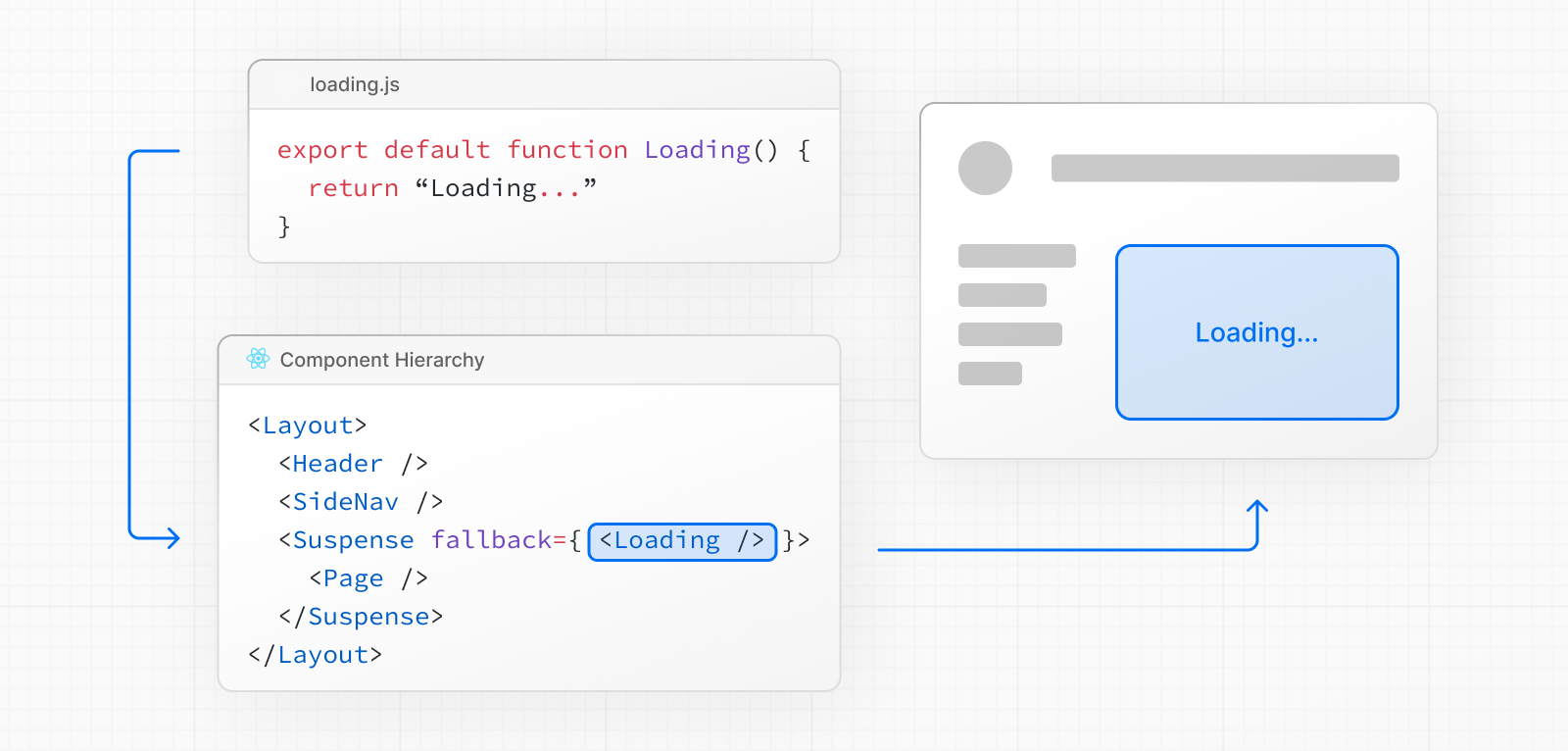
In the [component hierarchy](/docs/app/getting-started/project-structure#component-hierarchy), `loading.js` wraps `not-found.js`, `page.js`, and nested `layout.js` files in a `` boundary. It does **not** wrap the `layout.js`, `template.js`, or `error.js` in the same segment.
> **Good to know:**
>
> If the layout accesses uncached or runtime data (e.g. `cookies()`, `headers()`, or uncached fetches), `loading.js` will not show a fallback for it.
>
> - **Without [Cache Components](/docs/app/getting-started/caching):** Navigation blocks until the layout finishes rendering.
> - **With [Cache Components](/docs/app/getting-started/caching):** Uncached or runtime data access in the layout must be explicitly wrapped in ``, otherwise Next.js guides you with a build-time error. The static shell streams first, and the uncached content fills in.
>
> To ensure instant navigation, move uncached data fetching from `layout.js` into `page.js`, or wrap the runtime data access in your layout in its own `` boundary. See [layout.js Caveats](/docs/app/api-reference/file-conventions/layout#interaction-with-loadingjs) for details and examples.
### SEO
- For bots that only scrape static HTML, and cannot execute JavaScript like a full browser, such as Twitterbot, Next.js resolves [`generateMetadata`](/docs/app/api-reference/functions/generate-metadata) before streaming UI, and metadata is placed in the `` of the initial HTML.
- Otherwise, [streaming metadata](/docs/app/api-reference/functions/generate-metadata#streaming-metadata) may be used. Next.js automatically detects user agents to choose between blocking and streaming behavior.
- Since streaming is server-rendered, it does not impact SEO. You can use the [Rich Results Test](https://search.google.com/test/rich-results) tool from Google to see how your page appears to Google's web crawlers and view the serialized HTML ([source](https://web.dev/rendering-on-the-web/#seo-considerations)).
### Status codes
Streaming page responses begin with a `200` status code.
The initial response headers set the status for the rest of the response. Next.js can then stream redirects and HTTP access fallbacks with [`redirect`](/docs/app/api-reference/functions/redirect), [`notFound`](/docs/app/api-reference/functions/not-found), [`forbidden`](/docs/app/api-reference/functions/forbidden), or [`unauthorized`](/docs/app/api-reference/functions/unauthorized).
For example, when a 404 page is streamed to the client, Next.js includes a `` tag in the streamed HTML. This prevents search engines from indexing that URL even if the HTTP status is 200. See Google’s guidance on the [`robots` meta tag](https://developers.google.com/search/docs/crawling-indexing/robots-meta-tag).
Some crawlers may label these responses as “soft 404s”. The `noindex` tag keeps them out of search results.
Run the corresponding check before the response body streams to return a `404`, `403`, or `401` status for compliance or analytics.
For a `404`, you can check the slug in [Proxy](/docs/app/api-reference/file-conventions/proxy), then rewrite it to a not-found route or [return a `404` response](/docs/app/api-reference/file-conventions/proxy#producing-a-response). Keep Proxy checks fast, and avoid fetching full content there.
**When is the response body streamed?**
The response body starts streaming when a Suspense fallback renders (for example, a `loading.tsx`) or when a Server Component suspends under a `` boundary. Calling `notFound()`, `forbidden()`, or `unauthorized()` before this point preserves its `404`, `403`, or `401` status.
Starting the stream sends the response headers and fixes the status code.
### Browser limits
[Some browsers](https://bugs.webkit.org/show_bug.cgi?id=252413) buffer a streaming response. You may not see the streamed response until the response exceeds 1024 bytes. This typically only affects “hello world” applications, but not real applications.
## Platform Support
| Deployment Option | Supported |
| ------------------------------------------------------------------- | ----------------- |
| [Node.js server](/docs/app/getting-started/deploying#nodejs-server) | Yes |
| [Docker container](/docs/app/getting-started/deploying#docker) | Yes |
| [Static export](/docs/app/getting-started/deploying#static-export) | No |
| [Adapters](/docs/app/getting-started/deploying#adapters) | Platform-specific |
Learn how to [configure streaming](/docs/app/guides/self-hosting#streaming-and-suspense) when self-hosting Next.js.
## Examples
### Streaming with Suspense
In addition to `loading.js`, you can also manually create Suspense Boundaries for your own UI components. The App Router supports streaming with [Suspense](https://react.dev/reference/react/Suspense). See the [Streaming guide](/docs/app/guides/streaming) for more on how streaming works, including granular Suspense patterns, Route Handler streaming, and infrastructure considerations.
`` works by wrapping a component that performs an asynchronous action (e.g. fetch data), showing fallback UI (e.g. skeleton, spinner) while it's happening, and then swapping in your component once the action completes.
**TypeScript**
```tsx title="app/dashboard/page.tsx"
import { Suspense } from 'react'
import { PostFeed, Weather } from './Components'
export default function Posts() {
return (
Loading feed...}>
Loading weather...}>
)
}
```
**JavaScript**
```jsx title="app/dashboard/page.js"
import { Suspense } from 'react'
import { PostFeed, Weather } from './Components'
export default function Posts() {
return (
Loading feed...}>
Loading weather...}>
)
}
```
By using Suspense, you get the benefits of:
1. **Streaming Server Rendering** - Progressively rendering HTML from the server to the client.
2. **Selective Hydration** - React prioritizes what components to make interactive first based on user interaction.
For more Suspense examples and use cases, please see the [React Documentation](https://react.dev/reference/react/Suspense).
## Version History
| Version | Changes |
| --------- | --------------------- |
| `v13.0.0` | `loading` introduced. |
---
For a semantic overview of all documentation, see [/sitemap.md](/sitemap.md)
For an index of all available documentation, see [/docs/llms.txt](/docs/llms.txt)