---
title: Route Handlers and Middleware
description: Learn how to use Route Handlers and Middleware
url: "https://nextjs.org/docs/15/app/getting-started/route-handlers-and-middleware"
docs_index: /docs/15/llms.txt
version: 15.5.27
lastUpdated: 2025-09-23
prerequisites:
- "Getting Started: /docs/15/app/getting-started"
related:
- app/api-reference/file-conventions/route
- app/api-reference/file-conventions/middleware
- app/guides/backend-for-frontend
---
> For an index of all Next.js documentation, see [/docs/15/llms.txt](/docs/15/llms.txt).
## Route Handlers
Route Handlers allow you to create custom request handlers for a given route using the Web [Request](https://developer.mozilla.org/docs/Web/API/Request) and [Response](https://developer.mozilla.org/docs/Web/API/Response) APIs.
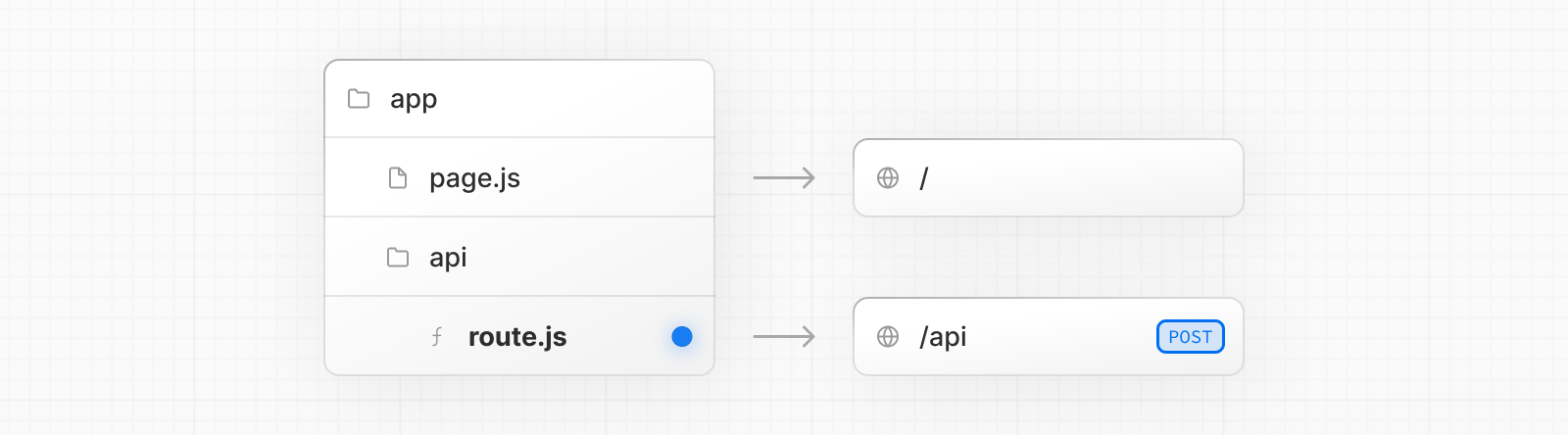
> **Good to know**: Route Handlers are only available inside the `app` directory. They are the equivalent of [API Routes](/docs/pages/building-your-application/routing/api-routes) inside the `pages` directory meaning you **do not** need to use API Routes and Route Handlers together.
### Convention
Route Handlers are defined in a [`route.js|ts` file](/docs/app/api-reference/file-conventions/route) inside the `app` directory:
```ts filename="app/api/route.ts" switcher
export async function GET(request: Request) {}
```
```js filename="app/api/route.js" switcher
export async function GET(request) {}
```
Route Handlers can be nested anywhere inside the `app` directory, similar to `page.js` and `layout.js`. But there **cannot** be a `route.js` file at the same route segment level as `page.js`.
### Supported HTTP Methods
The following [HTTP methods](https://developer.mozilla.org/docs/Web/HTTP/Methods) are supported: `GET`, `POST`, `PUT`, `PATCH`, `DELETE`, `HEAD`, and `OPTIONS`. If an unsupported method is called, Next.js will return a `405 Method Not Allowed` response.
### Extended `NextRequest` and `NextResponse` APIs
In addition to supporting the native [Request](https://developer.mozilla.org/docs/Web/API/Request) and [Response](https://developer.mozilla.org/docs/Web/API/Response) APIs, Next.js extends them with [`NextRequest`](/docs/app/api-reference/functions/next-request) and [`NextResponse`](/docs/app/api-reference/functions/next-response) to provide convenient helpers for advanced use cases.
### Caching
Route Handlers are not cached by default. You can, however, opt into caching for `GET` methods. Other supported HTTP methods are **not** cached. To cache a `GET` method, use a [route config option](/docs/app/api-reference/file-conventions/route-segment-config#dynamic) such as `export const dynamic = 'force-static'` in your Route Handler file.
```ts filename="app/items/route.ts" switcher
export const dynamic = 'force-static'
export async function GET() {
const res = await fetch('https://data.mongodb-api.com/...', {
headers: {
'Content-Type': 'application/json',
'API-Key': process.env.DATA_API_KEY,
},
})
const data = await res.json()
return Response.json({ data })
}
```
```js filename="app/items/route.js" switcher
export const dynamic = 'force-static'
export async function GET() {
const res = await fetch('https://data.mongodb-api.com/...', {
headers: {
'Content-Type': 'application/json',
'API-Key': process.env.DATA_API_KEY,
},
})
const data = await res.json()
return Response.json({ data })
}
```
> **Good to know**: Other supported HTTP methods are **not** cached, even if they are placed alongside a `GET` method that is cached, in the same file.
### Special Route Handlers
Special Route Handlers like [`sitemap.ts`](/docs/app/api-reference/file-conventions/metadata/sitemap), [`opengraph-image.tsx`](/docs/app/api-reference/file-conventions/metadata/opengraph-image), and [`icon.tsx`](/docs/app/api-reference/file-conventions/metadata/app-icons), and other [metadata files](/docs/app/api-reference/file-conventions/metadata) remain static by default unless they use Dynamic APIs or dynamic config options.
### Route Resolution
You can consider a `route` the lowest level routing primitive.
* They **do not** participate in layouts or client-side navigations like `page`.
* There **cannot** be a `route.js` file at the same route as `page.js`.
| Page | Route | Result |
| -------------------- | ------------------ | ---------------------------- |
| `app/page.js` | `app/route.js` | ✗ Conflict |
| `app/page.js` | `app/api/route.js` | ✓ Valid |
| `app/[user]/page.js` | `app/api/route.js` | ✓ Valid |
Each `route.js` or `page.js` file takes over all HTTP verbs for that route.
```ts filename="app/page.ts" switcher
export default function Page() {
return Hello, Next.js!
}
// Conflict
// `app/route.ts`
export async function POST(request: Request) {}
```
```js filename="app/page.js" switcher
export default function Page() {
return Hello, Next.js!
}
// Conflict
// `app/route.js`
export async function POST(request) {}
```
Read more about how Route Handlers [complement your frontend application](/docs/app/guides/backend-for-frontend), or explore the Route Handlers [API Reference](/docs/app/api-reference/file-conventions/route).
### Route Context Helper
In TypeScript, you can type the `context` parameter for Route Handlers with the globally available [`RouteContext`](/docs/app/api-reference/file-conventions/route#route-context-helper) helper:
```ts filename="app/users/[id]/route.ts" switcher
import type { NextRequest } from 'next/server'
export async function GET(_req: NextRequest, ctx: RouteContext<'/users/[id]'>) {
const { id } = await ctx.params
return Response.json({ id })
}
```
> **Good to know**
>
> * Types are generated during `next dev`, `next build` or `next typegen`.
## Middleware
Middleware allows you to run code before a request is completed. Then, based on the incoming request, you can modify the response by rewriting, redirecting, modifying the request or response headers, or responding directly.
### Use cases
Some common scenarios where Middleware is effective include:
* Quick redirects after reading parts of the incoming request
* Rewriting to different pages based on A/B tests or experiments
* Modifying headers for all pages or a subset of pages
Middleware is *not* a good fit for:
* Slow data fetching
* Session management
Using fetch with `options.cache`, `options.next.revalidate`, or `options.next.tags`, has no effect in Middleware.
### Convention
Create a `middleware.ts` (or `.js`) file in the project root, or inside `src` if applicable, so that it is located at the same level as `pages` or `app`.
> **Note**: While only one `middleware.ts` file is supported per project, you can still organize your middleware logic into modules. Break out middleware functionalities into separate `.ts` or `.js` files and import them into your main `middleware.ts` file. This allows for cleaner management of route-specific middleware, aggregated in the `middleware.ts` for centralized control. By enforcing a single middleware file, it simplifies configuration, prevents potential conflicts, and optimizes performance by avoiding multiple middleware layers.
### Example
```ts filename="middleware.ts" switcher
import { NextResponse } from 'next/server'
import type { NextRequest } from 'next/server'
// This function can be marked `async` if using `await` inside
export function middleware(request: NextRequest) {
return NextResponse.redirect(new URL('/home', request.url))
}
// See "Matching Paths" below to learn more
export const config = {
matcher: '/about/:path*',
}
```
```js filename="middleware.js" switcher
import { NextResponse } from 'next/server'
// This function can be marked `async` if using `await` inside
export function middleware(request) {
return NextResponse.redirect(new URL('/home', request.url))
}
// See "Matching Paths" below to learn more
export const config = {
matcher: '/about/:path*',
}
```
Read more about [using `middleware`](/docs/app/guides/backend-for-frontend#middleware), or refer to the `middleware` [API reference](/docs/app/api-reference/file-conventions/middleware).
## API Reference
Learn more about Route Handlers and Middleware
- [route.js](/docs/app/api-reference/file-conventions/route)
- API reference for the route.js special file.
- [Backend for Frontend](/docs/app/guides/backend-for-frontend)
- Learn how to use Next.js as a backend framework
---
For an index of all available documentation, see [/docs/15/llms.txt](/docs/15/llms.txt)