---
title: Route Handlers
description: "Create custom request handlers for a given route using the Web's Request and Response APIs."
url: "https://nextjs.org/docs/14/app/building-your-application/routing/route-handlers"
docs_index: /docs/14/llms.txt
lastUpdated: 2024-02-23
prerequisites:
- "Building Your Application: /docs/14/app/building-your-application"
- "Routing: /docs/14/app/building-your-application/routing"
related:
- /docs/14/app/api-reference/file-conventions/route
---
> For an index of all documentation, see [/docs/14/llms.txt](/docs/14/llms.txt).
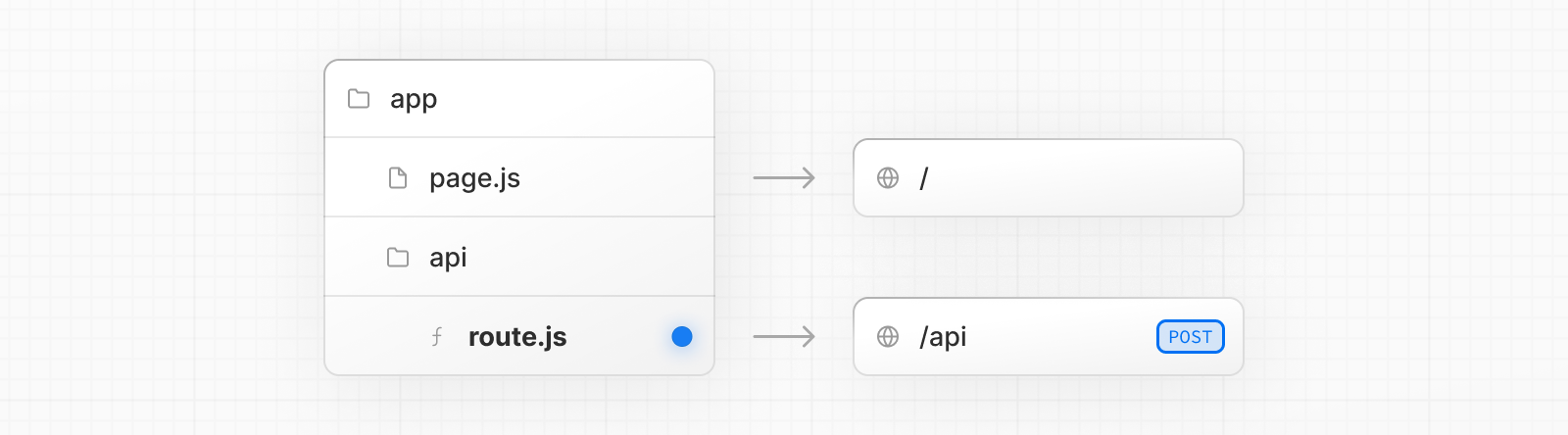
Route Handlers allow you to create custom request handlers for a given route using the Web [Request](https://developer.mozilla.org/docs/Web/API/Request) and [Response](https://developer.mozilla.org/docs/Web/API/Response) APIs.
> **Good to know:**
>
> Route Handlers are only available inside the `app` directory. They are the equivalent of [API Routes](/docs/pages/building-your-application/routing/api-routes) inside the `pages` directory meaning you **do not** need to use API Routes and Route Handlers together.
## Convention
Route Handlers are defined in a [`route.js|ts` file](/docs/app/api-reference/file-conventions/route) inside the `app` directory:
**TypeScript**
```ts title="app/api/route.ts"
export const dynamic = 'force-dynamic' // defaults to auto
export async function GET(request: Request) {}
```
**JavaScript**
```js title="app/api/route.js"
export const dynamic = 'force-dynamic' // defaults to auto
export async function GET(request) {}
```
Route Handlers can be nested inside the `app` directory, similar to `page.js` and `layout.js`. But there **cannot** be a `route.js` file at the same route segment level as `page.js`.
### Supported HTTP Methods
The following [HTTP methods](https://developer.mozilla.org/docs/Web/HTTP/Methods) are supported: `GET`, `POST`, `PUT`, `PATCH`, `DELETE`, `HEAD`, and `OPTIONS`. If an unsupported method is called, Next.js will return a `405 Method Not Allowed` response.
### Extended `NextRequest` and `NextResponse` APIs
In addition to supporting native [Request](https://developer.mozilla.org/docs/Web/API/Request) and [Response](https://developer.mozilla.org/docs/Web/API/Response). Next.js extends them with
[`NextRequest`](/docs/app/api-reference/functions/next-request) and [`NextResponse`](/docs/app/api-reference/functions/next-response) to provide convenient helpers for advanced use cases.
## Behavior
### Caching
Route Handlers are cached by default when using the `GET` method with the `Response` object.
**TypeScript**
```ts title="app/items/route.ts"
export async function GET() {
const res = await fetch('https://data.mongodb-api.com/...', {
headers: {
'Content-Type': 'application/json',
'API-Key': process.env.DATA_API_KEY,
},
})
const data = await res.json()
return Response.json({ data })
}
```
**JavaScript**
```js title="app/items/route.js"
export async function GET() {
const res = await fetch('https://data.mongodb-api.com/...', {
headers: {
'Content-Type': 'application/json',
'API-Key': process.env.DATA_API_KEY,
},
})
const data = await res.json()
return Response.json({ data })
}
```
> **TypeScript warning:**
>
> `Response.json()` is only valid from TypeScript 5.2. If you use a lower TypeScript version, you can use [`NextResponse.json()`](/docs/app/api-reference/functions/next-response#json) for typed responses instead.
### Opting out of caching
You can opt out of caching by:
- Using the `Request` object with the `GET` method.
- Using any of the other HTTP methods.
- Using [Dynamic Functions](#dynamic-functions) like `cookies` and `headers`.
- The [Segment Config Options](#segment-config-options) manually specifies dynamic mode.
For example:
**TypeScript**
```ts title="app/products/api/route.ts"
export async function GET(request: Request) {
const { searchParams } = new URL(request.url)
const id = searchParams.get('id')
const res = await fetch(`https://data.mongodb-api.com/product/${id}`, {
headers: {
'Content-Type': 'application/json',
'API-Key': process.env.DATA_API_KEY!,
},
})
const product = await res.json()
return Response.json({ product })
}
```
**JavaScript**
```js title="app/products/api/route.js"
export async function GET(request) {
const { searchParams } = new URL(request.url)
const id = searchParams.get('id')
const res = await fetch(`https://data.mongodb-api.com/product/${id}`, {
headers: {
'Content-Type': 'application/json',
'API-Key': process.env.DATA_API_KEY,
},
})
const product = await res.json()
return Response.json({ product })
}
```
Similarly, the `POST` method will cause the Route Handler to be evaluated dynamically.
**TypeScript**
```ts title="app/items/route.ts"
export async function POST() {
const res = await fetch('https://data.mongodb-api.com/...', {
method: 'POST',
headers: {
'Content-Type': 'application/json',
'API-Key': process.env.DATA_API_KEY!,
},
body: JSON.stringify({ time: new Date().toISOString() }),
})
const data = await res.json()
return Response.json(data)
}
```
**JavaScript**
```js title="app/items/route.js"
export async function POST() {
const res = await fetch('https://data.mongodb-api.com/...', {
method: 'POST',
headers: {
'Content-Type': 'application/json',
'API-Key': process.env.DATA_API_KEY,
},
body: JSON.stringify({ time: new Date().toISOString() }),
})
const data = await res.json()
return Response.json(data)
}
```
> **Good to know:**
>
> Like API Routes, Route Handlers can be used for cases like handling form submissions. A new abstraction for [handling forms and mutations](/docs/app/building-your-application/data-fetching/server-actions-and-mutations) that integrates deeply with React is being worked on.
### Route Resolution
You can consider a `route` the lowest level routing primitive.
- They **do not** participate in layouts or client-side navigations like `page`.
- There **cannot** be a `route.js` file at the same route as `page.js`.
| Page | Route | Result |
| -------------------- | ------------------ | ---------- |
| `app/page.js` | `app/route.js` | ✗ Conflict |
| `app/page.js` | `app/api/route.js` | ✓ Valid |
| `app/[user]/page.js` | `app/api/route.js` | ✓ Valid |
Each `route.js` or `page.js` file takes over all HTTP verbs for that route.
```jsx title="app/page.js"
export default function Page() {
return
Hello, Next.js!
}
// ❌ Conflict
// `app/route.js`
export async function POST(request) {}
```
## Examples
The following examples show how to combine Route Handlers with other Next.js APIs and features.
### Revalidating Cached Data
You can [revalidate cached data](/docs/app/building-your-application/data-fetching/fetching-caching-and-revalidating#revalidating-data) using the [`next.revalidate`](/docs/app/building-your-application/data-fetching/fetching-caching-and-revalidating#revalidating-data) option:
**TypeScript**
```ts title="app/items/route.ts"
export async function GET() {
const res = await fetch('https://data.mongodb-api.com/...', {
next: { revalidate: 60 }, // Revalidate every 60 seconds
})
const data = await res.json()
return Response.json(data)
}
```
**JavaScript**
```js title="app/items/route.js"
export async function GET() {
const res = await fetch('https://data.mongodb-api.com/...', {
next: { revalidate: 60 }, // Revalidate every 60 seconds
})
const data = await res.json()
return Response.json(data)
}
```
Alternatively, you can use the [`revalidate` segment config option](/docs/app/api-reference/file-conventions/route-segment-config#revalidate):
```ts
export const revalidate = 60
```
### Dynamic Functions
Route Handlers can be used with dynamic functions from Next.js, like [`cookies`](/docs/app/api-reference/functions/cookies) and [`headers`](/docs/app/api-reference/functions/headers).
#### Cookies
You can read or set cookies with [`cookies`](/docs/app/api-reference/functions/cookies) from `next/headers`. This server function can be called directly in a Route Handler, or nested inside of another function.
Alternatively, you can return a new `Response` using the [`Set-Cookie`](https://developer.mozilla.org/docs/Web/HTTP/Headers/Set-Cookie) header.
**TypeScript**
```ts title="app/api/route.ts"
import { cookies } from 'next/headers'
export async function GET(request: Request) {
const cookieStore = cookies()
const token = cookieStore.get('token')
return new Response('Hello, Next.js!', {
status: 200,
headers: { 'Set-Cookie': `token=${token.value}` },
})
}
```
**JavaScript**
```js title="app/api/route.js"
import { cookies } from 'next/headers'
export async function GET(request) {
const cookieStore = cookies()
const token = cookieStore.get('token')
return new Response('Hello, Next.js!', {
status: 200,
headers: { 'Set-Cookie': `token=${token}` },
})
}
```
You can also use the underlying Web APIs to read cookies from the request ([`NextRequest`](/docs/app/api-reference/functions/next-request)):
**TypeScript**
```ts title="app/api/route.ts"
import { type NextRequest } from 'next/server'
export async function GET(request: NextRequest) {
const token = request.cookies.get('token')
}
```
**JavaScript**
```js title="app/api/route.js"
export async function GET(request) {
const token = request.cookies.get('token')
}
```
#### Headers
You can read headers with [`headers`](/docs/app/api-reference/functions/headers) from `next/headers`. This server function can be called directly in a Route Handler, or nested inside of another function.
This `headers` instance is read-only. To set headers, you need to return a new `Response` with new `headers`.
**TypeScript**
```ts title="app/api/route.ts"
import { headers } from 'next/headers'
export async function GET(request: Request) {
const headersList = headers()
const referer = headersList.get('referer')
return new Response('Hello, Next.js!', {
status: 200,
headers: { referer: referer },
})
}
```
**JavaScript**
```js title="app/api/route.js"
import { headers } from 'next/headers'
export async function GET(request) {
const headersList = headers()
const referer = headersList.get('referer')
return new Response('Hello, Next.js!', {
status: 200,
headers: { referer: referer },
})
}
```
You can also use the underlying Web APIs to read headers from the request ([`NextRequest`](/docs/app/api-reference/functions/next-request)):
**TypeScript**
```ts title="app/api/route.ts"
import { type NextRequest } from 'next/server'
export async function GET(request: NextRequest) {
const requestHeaders = new Headers(request.headers)
}
```
**JavaScript**
```js title="app/api/route.js"
export async function GET(request) {
const requestHeaders = new Headers(request.headers)
}
```
### Redirects
**TypeScript**
```ts title="app/api/route.ts"
import { redirect } from 'next/navigation'
export async function GET(request: Request) {
redirect('https://nextjs.org/')
}
```
**JavaScript**
```js title="app/api/route.js"
import { redirect } from 'next/navigation'
export async function GET(request) {
redirect('https://nextjs.org/')
}
```
### Dynamic Route Segments
> We recommend reading the [Defining Routes](/docs/app/building-your-application/routing/defining-routes) page before continuing.
Route Handlers can use [Dynamic Segments](/docs/app/building-your-application/routing/dynamic-routes) to create request handlers from dynamic data.
**TypeScript**
```ts title="app/items/[slug]/route.ts"
export async function GET(
request: Request,
{ params }: { params: { slug: string } }
) {
const slug = params.slug // 'a', 'b', or 'c'
}
```
**JavaScript**
```js title="app/items/[slug]/route.js"
export async function GET(request, { params }) {
const slug = params.slug // 'a', 'b', or 'c'
}
```
| Route | Example URL | `params` |
| --------------------------- | ----------- | --------------- |
| `app/items/[slug]/route.js` | `/items/a` | `{ slug: 'a' }` |
| `app/items/[slug]/route.js` | `/items/b` | `{ slug: 'b' }` |
| `app/items/[slug]/route.js` | `/items/c` | `{ slug: 'c' }` |
### URL Query Parameters
The request object passed to the Route Handler is a `NextRequest` instance, which has [some additional convenience methods](/docs/app/api-reference/functions/next-request#nexturl), including for more easily handling query parameters.
**TypeScript**
```ts title="app/api/search/route.ts"
import { type NextRequest } from 'next/server'
export function GET(request: NextRequest) {
const searchParams = request.nextUrl.searchParams
const query = searchParams.get('query')
// query is "hello" for /api/search?query=hello
}
```
**JavaScript**
```js title="app/api/search/route.js"
export function GET(request) {
const searchParams = request.nextUrl.searchParams
const query = searchParams.get('query')
// query is "hello" for /api/search?query=hello
}
```
### Streaming
Streaming is commonly used in combination with Large Language Models (LLMs), such as OpenAI, for AI-generated content. Learn more about the [AI SDK](https://sdk.vercel.ai/docs).
**TypeScript**
```ts title="app/api/chat/route.ts"
import OpenAI from 'openai'
import { OpenAIStream, StreamingTextResponse } from 'ai'
const openai = new OpenAI({
apiKey: process.env.OPENAI_API_KEY,
})
export const runtime = 'edge'
export async function POST(req: Request) {
const { messages } = await req.json()
const response = await openai.chat.completions.create({
model: 'gpt-3.5-turbo',
stream: true,
messages,
})
const stream = OpenAIStream(response)
return new StreamingTextResponse(stream)
}
```
**JavaScript**
```js title="app/api/chat/route.js"
import OpenAI from 'openai'
import { OpenAIStream, StreamingTextResponse } from 'ai'
const openai = new OpenAI({
apiKey: process.env.OPENAI_API_KEY,
})
export const runtime = 'edge'
export async function POST(req) {
const { messages } = await req.json()
const response = await openai.chat.completions.create({
model: 'gpt-3.5-turbo',
stream: true,
messages,
})
const stream = OpenAIStream(response)
return new StreamingTextResponse(stream)
}
```
These abstractions use the Web APIs to create a stream. You can also use the underlying Web APIs directly.
**TypeScript**
```ts title="app/api/route.ts"
// https://developer.mozilla.org/docs/Web/API/ReadableStream#convert_async_iterator_to_stream
function iteratorToStream(iterator: any) {
return new ReadableStream({
async pull(controller) {
const { value, done } = await iterator.next()
if (done) {
controller.close()
} else {
controller.enqueue(value)
}
},
})
}
function sleep(time: number) {
return new Promise((resolve) => {
setTimeout(resolve, time)
})
}
const encoder = new TextEncoder()
async function* makeIterator() {
yield encoder.encode('
One
')
await sleep(200)
yield encoder.encode('
Two
')
await sleep(200)
yield encoder.encode('
Three
')
}
export async function GET() {
const iterator = makeIterator()
const stream = iteratorToStream(iterator)
return new Response(stream)
}
```
**JavaScript**
```js title="app/api/route.js"
// https://developer.mozilla.org/docs/Web/API/ReadableStream#convert_async_iterator_to_stream
function iteratorToStream(iterator) {
return new ReadableStream({
async pull(controller) {
const { value, done } = await iterator.next()
if (done) {
controller.close()
} else {
controller.enqueue(value)
}
},
})
}
function sleep(time) {
return new Promise((resolve) => {
setTimeout(resolve, time)
})
}
const encoder = new TextEncoder()
async function* makeIterator() {
yield encoder.encode('
One
')
await sleep(200)
yield encoder.encode('
Two
')
await sleep(200)
yield encoder.encode('
Three
')
}
export async function GET() {
const iterator = makeIterator()
const stream = iteratorToStream(iterator)
return new Response(stream)
}
```
### Request Body
You can read the `Request` body using the standard Web API methods:
**TypeScript**
```ts title="app/items/route.ts"
export async function POST(request: Request) {
const res = await request.json()
return Response.json({ res })
}
```
**JavaScript**
```js title="app/items/route.js"
export async function POST(request) {
const res = await request.json()
return Response.json({ res })
}
```
### Request Body FormData
You can read the `FormData` using the `request.formData()` function:
**TypeScript**
```ts title="app/items/route.ts"
export async function POST(request: Request) {
const formData = await request.formData()
const name = formData.get('name')
const email = formData.get('email')
return Response.json({ name, email })
}
```
**JavaScript**
```js title="app/items/route.js"
export async function POST(request) {
const formData = await request.formData()
const name = formData.get('name')
const email = formData.get('email')
return Response.json({ name, email })
}
```
Since `formData` data are all strings, you may want to use [`zod-form-data`](https://www.npmjs.com/zod-form-data) to validate the request and retrieve data in the format you prefer (e.g. `number`).
### CORS
You can set CORS headers on a `Response` using the standard Web API methods:
**TypeScript**
```ts title="app/api/route.ts"
export const dynamic = 'force-dynamic' // defaults to auto
export async function GET(request: Request) {
return new Response('Hello, Next.js!', {
status: 200,
headers: {
'Access-Control-Allow-Origin': '*',
'Access-Control-Allow-Methods': 'GET, POST, PUT, DELETE, OPTIONS',
'Access-Control-Allow-Headers': 'Content-Type, Authorization',
},
})
}
```
**JavaScript**
```js title="app/api/route.js"
export const dynamic = 'force-dynamic' // defaults to auto
export async function GET(request) {
return new Response('Hello, Next.js!', {
status: 200,
headers: {
'Access-Control-Allow-Origin': '*',
'Access-Control-Allow-Methods': 'GET, POST, PUT, DELETE, OPTIONS',
'Access-Control-Allow-Headers': 'Content-Type, Authorization',
},
})
}
```
### Webhooks
You can use a Route Handler to receive webhooks from third-party services:
**TypeScript**
```ts title="app/api/route.ts"
export async function POST(request: Request) {
try {
const text = await request.text()
// Process the webhook payload
} catch (error) {
return new Response(`Webhook error: ${error.message}`, {
status: 400,
})
}
return new Response('Success!', {
status: 200,
})
}
```
**JavaScript**
```js title="app/api/route.js"
export async function POST(request) {
try {
const text = await request.text()
// Process the webhook payload
} catch (error) {
return new Response(`Webhook error: ${error.message}`, {
status: 400,
})
}
return new Response('Success!', {
status: 200,
})
}
```
Notably, unlike API Routes with the Pages Router, you do not need to use `bodyParser` to use any additional configuration.
### Edge and Node.js Runtimes
Route Handlers have an isomorphic Web API to support both Edge and Node.js runtimes seamlessly, including support for streaming. Since Route Handlers use the same [route segment configuration](/docs/app/api-reference/file-conventions/route-segment-config) as Pages and Layouts, they support long-awaited features like general-purpose [statically regenerated](/docs/app/building-your-application/data-fetching/fetching-caching-and-revalidating#revalidating-data) Route Handlers.
You can use the `runtime` segment config option to specify the runtime:
```ts
export const runtime = 'edge' // 'nodejs' is the default
```
### Non-UI Responses
You can use Route Handlers to return non-UI content. Note that [`sitemap.xml`](/docs/app/api-reference/file-conventions/metadata/sitemap#generating-a-sitemap-using-code-js-ts), [`robots.txt`](/docs/app/api-reference/file-conventions/metadata/robots#generate-a-robots-file), [`app icons`](/docs/app/api-reference/file-conventions/metadata/app-icons#generate-icons-using-code-js-ts-tsx), and [open graph images](/docs/app/api-reference/file-conventions/metadata/opengraph-image) all have built-in support.
**TypeScript**
```ts title="app/rss.xml/route.ts"
export const dynamic = 'force-dynamic' // defaults to auto
export async function GET() {
return new Response(
`
Next.js Documentation
https://nextjs.org/docs
The React Framework for the Web`,
{
headers: {
'Content-Type': 'text/xml',
},
}
)
}
```
**JavaScript**
```js title="app/rss.xml/route.js"
export const dynamic = 'force-dynamic' // defaults to auto
export async function GET() {
return new Response(`
Next.js Documentation
https://nextjs.org/docs
The React Framework for the Web`)
}
```
### Segment Config Options
Route Handlers use the same [route segment configuration](/docs/app/api-reference/file-conventions/route-segment-config) as pages and layouts.
**TypeScript**
```ts title="app/items/route.ts"
export const dynamic = 'auto'
export const dynamicParams = true
export const revalidate = false
export const fetchCache = 'auto'
export const runtime = 'nodejs'
export const preferredRegion = 'auto'
```
**JavaScript**
```js title="app/items/route.js"
export const dynamic = 'auto'
export const dynamicParams = true
export const revalidate = false
export const fetchCache = 'auto'
export const runtime = 'nodejs'
export const preferredRegion = 'auto'
```
See the [API reference](/docs/app/api-reference/file-conventions/route-segment-config) for more details.
## API Reference
Learn more about the route.js file.
- [route.js](/docs/14/app/api-reference/file-conventions/route): API reference for the route.js special file.
---
For a semantic overview of all documentation, see [/sitemap.md](/sitemap.md)
For an index of all available documentation, see [/docs/14/llms.txt](/docs/14/llms.txt)