---
title: Error Handling
description: Handle runtime errors by automatically wrapping route segments and their nested children in a React Error Boundary.
url: "https://nextjs.org/docs/14/app/building-your-application/routing/error-handling"
docs_index: /docs/14/llms.txt
lastUpdated: 2024-02-29
prerequisites:
- "Building Your Application: /docs/14/app/building-your-application"
- "Routing: /docs/14/app/building-your-application/routing"
related:
- /docs/14/app/api-reference/file-conventions/error
---
> For an index of all documentation, see [/docs/14/llms.txt](/docs/14/llms.txt).
The `error.js` file convention allows you to gracefully handle unexpected runtime errors in [nested routes](/docs/app/building-your-application/routing#nested-routes).
- Automatically wrap a route segment and its nested children in a [React Error Boundary](https://react.dev/reference/react/Component#catching-rendering-errors-with-an-error-boundary).
- Create error UI tailored to specific segments using the file-system hierarchy to adjust granularity.
- Isolate errors to affected segments while keeping the rest of the application functional.
- Add functionality to attempt to recover from an error without a full page reload.
Create error UI by adding an `error.js` file inside a route segment and exporting a React component:

**TypeScript**
```tsx title="app/dashboard/error.tsx"
'use client' // Error components must be Client Components
import { useEffect } from 'react'
export default function Error({
error,
reset,
}: {
error: Error & { digest?: string }
reset: () => void
}) {
useEffect(() => {
// Log the error to an error reporting service
console.error(error)
}, [error])
return (
Something went wrong!
)
}
```
**JavaScript**
```jsx title="app/dashboard/error.js"
'use client' // Error components must be Client Components
import { useEffect } from 'react'
export default function Error({ error, reset }) {
useEffect(() => {
// Log the error to an error reporting service
console.error(error)
}, [error])
return (
Something went wrong!
)
}
```
### How `error.js` Works
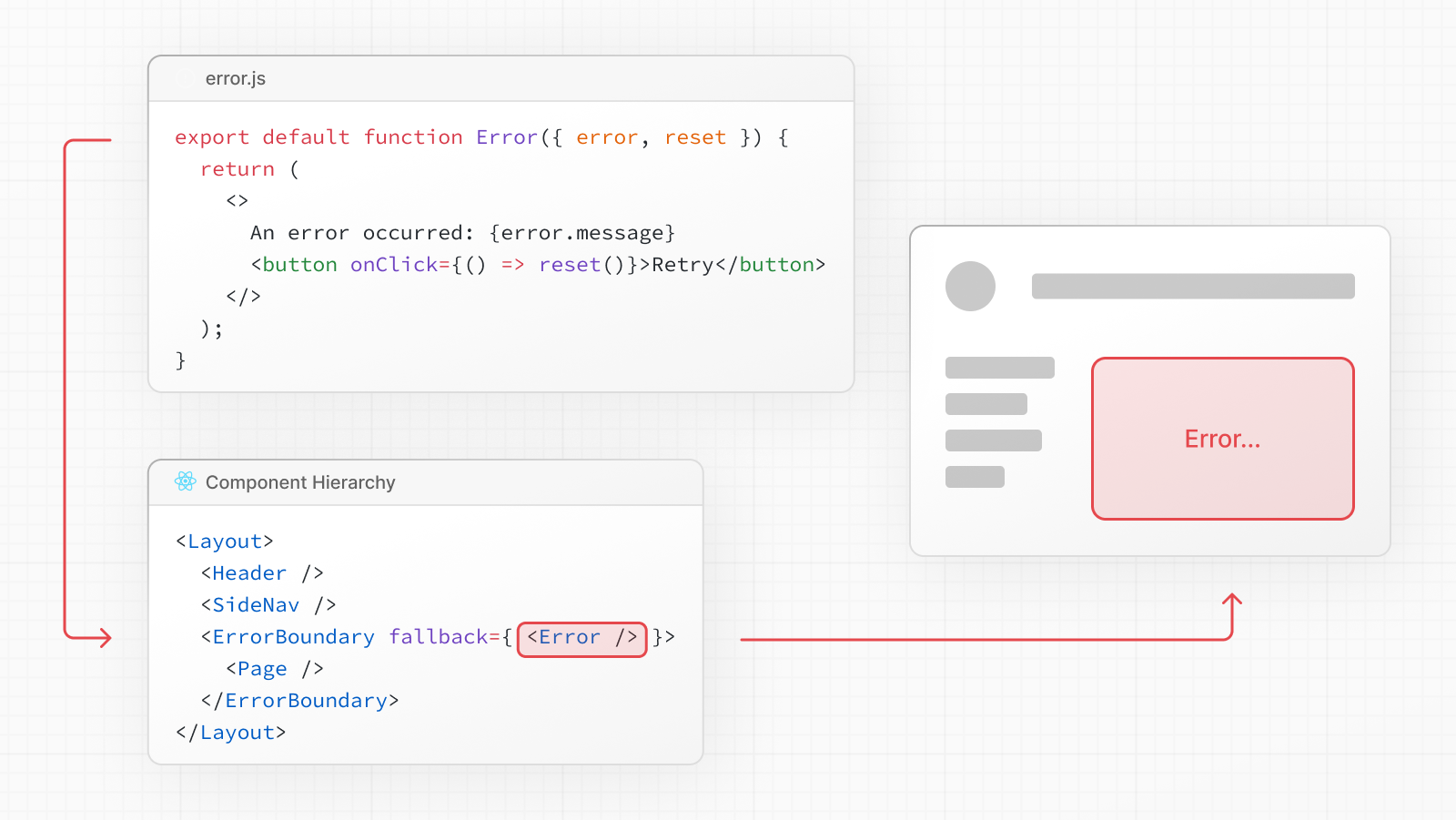
- `error.js` automatically creates a [React Error Boundary](https://react.dev/reference/react/Component#catching-rendering-errors-with-an-error-boundary) that **wraps** a nested child segment or `page.js` component.
- The React component exported from the `error.js` file is used as the **fallback** component.
- If an error is thrown within the error boundary, the error is **contained**, and the fallback component is **rendered**.
- When the fallback error component is active, layouts **above** the error boundary **maintain** their state and **remain** interactive, and the error component can display functionality to recover from the error.
### Recovering From Errors
The cause of an error can sometimes be temporary. In these cases, simply trying again might resolve the issue.
An error component can use the `reset()` function to prompt the user to attempt to recover from the error. When executed, the function will try to re-render the Error boundary's contents. If successful, the fallback error component is replaced with the result of the re-render.
**TypeScript**
```tsx title="app/dashboard/error.tsx"
'use client'
export default function Error({
error,
reset,
}: {
error: Error & { digest?: string }
reset: () => void
}) {
return (
)
}
```
### Nested Routes
React components created through [special files](/docs/app/building-your-application/routing#file-conventions) are rendered in a [specific nested hierarchy](/docs/app/building-your-application/routing#component-hierarchy).
For example, a nested route with two segments that both include `layout.js` and `error.js` files are rendered in the following *simplified* component hierarchy:
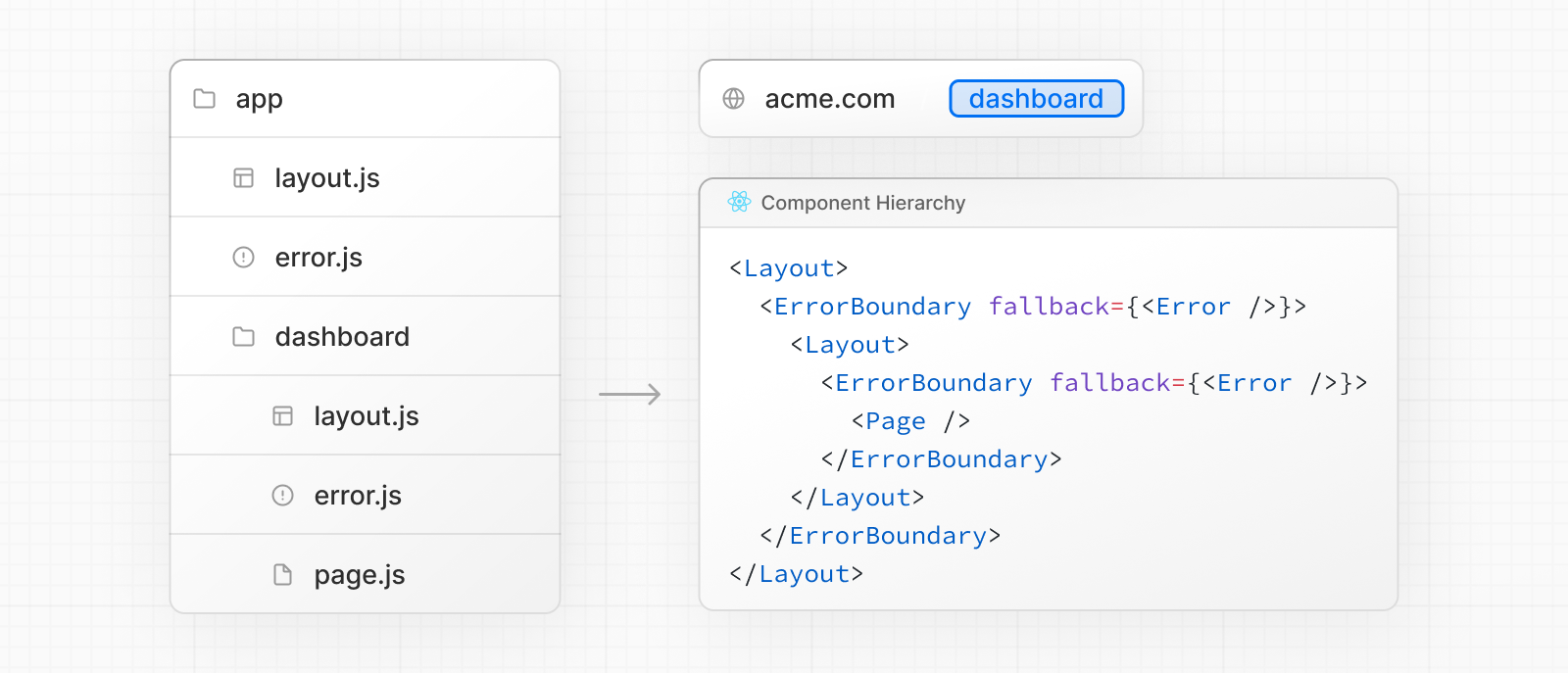
The nested component hierarchy has implications for the behavior of `error.js` files across a nested route:
- Errors bubble up to the nearest parent error boundary. This means an `error.js` file will handle errors for all its nested child segments. More or less granular error UI can be achieved by placing `error.js` files at different levels in the nested folders of a route.
- An `error.js` boundary will **not** handle errors thrown in a `layout.js` component in the **same** segment because the error boundary is nested **inside** that layout's component.
### Handling Errors in Layouts
`error.js` boundaries do **not** catch errors thrown in `layout.js` or `template.js` components of the **same segment**. This [intentional hierarchy](#nested-routes) keeps important UI that is shared between sibling routes (such as navigation) visible and functional when an error occurs.
To handle errors within a specific layout or template, place an `error.js` file in the layout's parent segment.
To handle errors within the root layout or template, use a variation of `error.js` called `global-error.js`.
### Handling Errors in Root Layouts
The root `app/error.js` boundary does **not** catch errors thrown in the root `app/layout.js` or `app/template.js` component.
To specifically handle errors in these root components, use a variation of `error.js` called `app/global-error.js` located in the root `app` directory.
Unlike the root `error.js`, the `global-error.js` error boundary wraps the **entire** application, and its fallback component replaces the root layout when active. Because of this, it is important to note that `global-error.js` **must** define its own `` and `` tags.
`global-error.js` is the least granular error UI and can be considered "catch-all" error handling for the whole application. It is unlikely to be triggered often as root components are typically less dynamic, and other `error.js` boundaries will catch most errors.
Even if a `global-error.js` is defined, it is still recommended to define a root `error.js` whose fallback component will be rendered **within** the root layout, which includes globally shared UI and branding.
**TypeScript**
```tsx title="app/global-error.tsx"
'use client'
export default function GlobalError({
error,
reset,
}: {
error: Error & { digest?: string }
reset: () => void
}) {
return (
)
}
```
### Handling Server Errors
If an error is thrown inside a Server Component, Next.js will forward an `Error` object (stripped of sensitive error information in production) to the nearest `error.js` file as the `error` prop.
#### Securing Sensitive Error Information
During production, the `Error` object forwarded to the client only includes a generic `message` and `digest` property.
This is a security precaution to avoid leaking potentially sensitive details included in the error to the client.
The `message` property contains a generic message about the error and the `digest` property contains an automatically generated hash of the error that can be used to match the corresponding error in server-side logs.
During development, the `Error` object forwarded to the client will be serialized and include the `message` of the original error for easier debugging.
- [error.js](/docs/14/app/api-reference/file-conventions/error): API reference for the error.js special file.
---
For a semantic overview of all documentation, see [/sitemap.md](/sitemap.md)
For an index of all available documentation, see [/docs/14/llms.txt](/docs/14/llms.txt)