---
title: TypeScript
description: Next.js provides a TypeScript-first development experience for building your React application.
url: "https://nextjs.org/docs/14/app/building-your-application/configuring/typescript"
docs_index: /docs/14/llms.txt
lastUpdated: 2024-01-14
prerequisites:
- "Building Your Application: /docs/14/app/building-your-application"
- "Configuring: /docs/14/app/building-your-application/configuring"
---
> For an index of all documentation, see [/docs/14/llms.txt](/docs/14/llms.txt).
Next.js provides a TypeScript-first development experience for building your React application.
It comes with built-in TypeScript support for automatically installing the necessary packages and configuring the proper settings.
As well as a [TypeScript Plugin](#typescript-plugin) for your editor.
> **🎥 Watch:**
>
> Learn about the built-in TypeScript plugin → [YouTube (3 minutes)](https://www.youtube.com/watch?v=pqMqn9fKEf8)
## New Projects
`create-next-app` now ships with TypeScript by default.
```bash title="Terminal"
npx create-next-app@latest
```
## Existing Projects
Add TypeScript to your project by renaming a file to `.ts` / `.tsx`. Run `next dev` and `next build` to automatically install the necessary dependencies and add a `tsconfig.json` file with the recommended config options.
If you already had a `jsconfig.json` file, copy the `paths` compiler option from the old `jsconfig.json` into the new `tsconfig.json` file, and delete the old `jsconfig.json` file.
## TypeScript Plugin
Next.js includes a custom TypeScript plugin and type checker, which VSCode and other code editors can use for advanced type-checking and auto-completion.
You can enable the plugin in VS Code by:
1. Opening the command palette (`Ctrl/⌘` + `Shift` + `P`)
2. Searching for "TypeScript: Select TypeScript Version"
3. Selecting "Use Workspace Version"
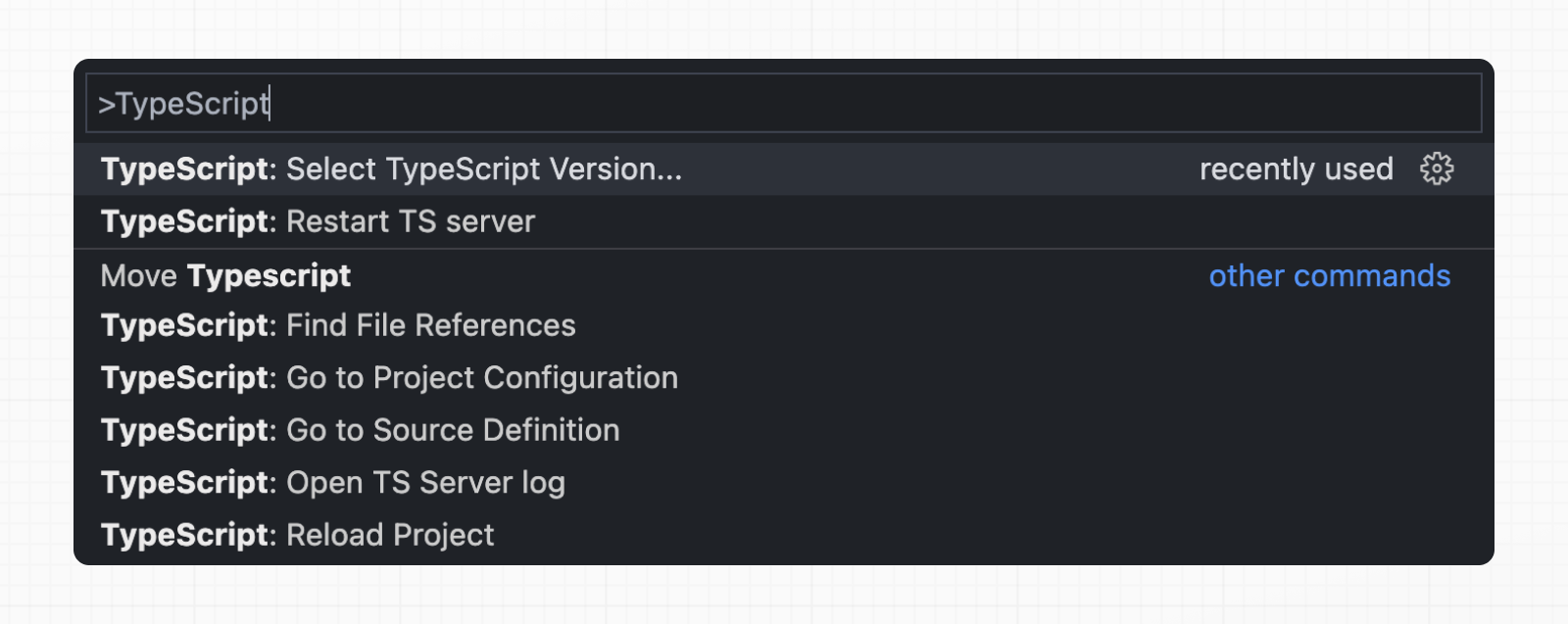
Now, when editing files, the custom plugin will be enabled. When running `next build`, the custom type checker will be used.
### Plugin Features
The TypeScript plugin can help with:
- Warning if the invalid values for [segment config options](/docs/app/api-reference/file-conventions/route-segment-config) are passed.
- Showing available options and in-context documentation.
- Ensuring the `use client` directive is used correctly.
- Ensuring client hooks (like `useState`) are only used in Client Components.
> **Good to know:**
>
> More features will be added in the future.
## Minimum TypeScript Version
It is highly recommended to be on at least `v4.5.2` of TypeScript to get syntax features such as [type modifiers on import names](https://devblogs.microsoft.com/typescript/announcing-typescript-4-5/#type-on-import-names) and [performance improvements](https://devblogs.microsoft.com/typescript/announcing-typescript-4-5/#real-path-sync-native).
## Statically Typed Links
Next.js can statically type links to prevent typos and other errors when using `next/link`, improving type safety when navigating between pages.
To opt-into this feature, `experimental.typedRoutes` need to be enabled and the project needs to be using TypeScript.
```js title="next.config.js"
/** @type {import('next').NextConfig} */
const nextConfig = {
experimental: {
typedRoutes: true,
},
}
module.exports = nextConfig
```
Next.js will generate a link definition in `.next/types` that contains information about all existing routes in your application, which TypeScript can then use to provide feedback in your editor about invalid links.
Currently, experimental support includes any string literal, including dynamic segments. For non-literal strings, you currently need to manually cast the `href` with `as Route`:
```tsx
import type { Route } from 'next';
import Link from 'next/link'
// No TypeScript errors if href is a valid route
// TypeScript errors if href is not a valid route
```
To accept `href` in a custom component wrapping `next/link`, use a generic:
```tsx
import type { Route } from 'next'
import Link from 'next/link'
function Card({ href }: { href: Route | URL }) {
return (
My Card
)
}
```
> **How does it work?**
>
> When running `next dev` or `next build`, Next.js generates a hidden `.d.ts` file inside `.next` that contains information about all existing routes in your application (all valid routes as the `href` type of `Link`). This `.d.ts` file is included in `tsconfig.json` and the TypeScript compiler will check that `.d.ts` and provide feedback in your editor about invalid links.
## End-to-End Type Safety
The Next.js App Router has **enhanced type safety**. This includes:
1. **No serialization of data between fetching function and page**: You can `fetch` directly in components, layouts, and pages on the server. This data *does not* need to be serialized (converted to a string) to be passed to the client side for consumption in React. Instead, since `app` uses Server Components by default, we can use values like `Date`, `Map`, `Set`, and more without any extra steps. Previously, you needed to manually type the boundary between server and client with Next.js-specific types.
2. **Streamlined data flow between components**: With the removal of `_app` in favor of root layouts, it is now easier to visualize the data flow between components and pages. Previously, data flowing between individual `pages` and `_app` were difficult to type and could introduce confusing bugs. With [colocated data fetching](/docs/app/building-your-application/data-fetching/fetching-caching-and-revalidating) in the App Router, this is no longer an issue.
[Data Fetching in Next.js](/docs/app/building-your-application/data-fetching/fetching-caching-and-revalidating) now provides as close to end-to-end type safety as possible without being prescriptive about your database or content provider selection.
We're able to type the response data as you would expect with normal TypeScript. For example:
```tsx title="app/page.tsx"
async function getData() {
const res = await fetch('https://api.example.com/...')
// The return value is *not* serialized
// You can return Date, Map, Set, etc.
return res.json()
}
export default async function Page() {
const name = await getData()
return '...'
}
```
For *complete* end-to-end type safety, this also requires your database or content provider to support TypeScript. This could be through using an [ORM](https://en.wikipedia.org/wiki/Object%E2%80%93relational_mapping) or type-safe query builder.
## Async Server Component TypeScript Error
To use an `async` Server Component with TypeScript, ensure you are using TypeScript `5.1.3` or higher and `@types/react` `18.2.8` or higher.
If you are using an older version of TypeScript, you may see a `'Promise' is not a valid JSX element` type error. Updating to the latest version of TypeScript and `@types/react` should resolve this issue.
## Passing Data Between Server & Client Components
When passing data between a Server and Client Component through props, the data is still serialized (converted to a string) for use in the browser. However, it does not need a special type. It’s typed the same as passing any other props between components.
Further, there is less code to be serialized, as un-rendered data does not cross between the server and client (it remains on the server). This is only now possible through support for Server Components.
## Path aliases and baseUrl
Next.js automatically supports the `tsconfig.json` `"paths"` and `"baseUrl"` options.
You can learn more about this feature on the [Module Path aliases documentation](/docs/app/building-your-application/configuring/absolute-imports-and-module-aliases).
## Type checking next.config.js
The `next.config.js` file must be a JavaScript file as it does not get parsed by Babel or TypeScript, however you can add some type checking in your IDE using JSDoc as below:
```js
// @ts-check
/**
* @type {import('next').NextConfig}
**/
const nextConfig = {
/* config options here */
}
module.exports = nextConfig
```
## Incremental type checking
Since `v10.2.1` Next.js supports [incremental type checking](https://www.typescriptlang.org/tsconfig#incremental) when enabled in your `tsconfig.json`, this can help speed up type checking in larger applications.
## Ignoring TypeScript Errors
Next.js fails your **production build** (`next build`) when TypeScript errors are present in your project.
If you'd like Next.js to dangerously produce production code even when your application has errors, you can disable the built-in type checking step.
If disabled, be sure you are running type checks as part of your build or deploy process, otherwise this can be very dangerous.
Open `next.config.js` and enable the `ignoreBuildErrors` option in the `typescript` config:
```js title="next.config.js"
module.exports = {
typescript: {
// !! WARN !!
// Dangerously allow production builds to successfully complete even if
// your project has type errors.
// !! WARN !!
ignoreBuildErrors: true,
},
}
```
## Custom Type Declarations
When you need to declare custom types, you might be tempted to modify `next-env.d.ts`. However, this file is automatically generated, so any changes you make will be overwritten. Instead, you should create a new file, let's call it `new-types.d.ts`, and reference it in your `tsconfig.json`:
```json title="tsconfig.json"
{
"compilerOptions": {
"skipLibCheck": true
//...truncated...
},
"include": [
"new-types.d.ts",
"next-env.d.ts",
".next/types/**/*.ts",
"**/*.ts",
"**/*.tsx"
],
"exclude": ["node_modules"]
}
```
## Version Changes
| Version | Changes |
| --------- | ------------------------------------------------------------------------------------------------------------------------------------ |
| `v13.2.0` | Statically typed links are available in beta. |
| `v12.0.0` | [SWC](/docs/architecture/nextjs-compiler) is now used by default to compile TypeScript and TSX for faster builds. |
| `v10.2.1` | [Incremental type checking](https://www.typescriptlang.org/tsconfig#incremental) support added when enabled in your `tsconfig.json`. |
---
For a semantic overview of all documentation, see [/sitemap.md](/sitemap.md)
For an index of all available documentation, see [/docs/14/llms.txt](/docs/14/llms.txt)