---
title: Installation
description: "Create a new Next.js application with `create-next-app`. Set up TypeScript, styles, and configure your `next.config.js` file."
url: "https://nextjs.org/docs/13/getting-started/installation"
docs_index: /docs/13/llms.txt
lastUpdated: 2023-09-27
prerequisites:
- "Getting Started: /docs/13/getting-started"
related:
- /docs/13/getting-started/project-structure
---
> For an index of all documentation, see [/docs/13/llms.txt](/docs/13/llms.txt).
System Requirements:
- [Node.js 16.14](https://nodejs.org/) or later.
- macOS, Windows (including WSL), and Linux are supported.
## Automatic Installation
We recommend starting a new Next.js app using [`create-next-app`](/docs/app/api-reference/create-next-app), which sets up everything automatically for you. To create a project, run:
```bash title="Terminal"
npx create-next-app@latest
```
On installation, you'll see the following prompts:
```txt title="Terminal"
What is your project named? my-app
Would you like to use TypeScript? No / Yes
Would you like to use ESLint? No / Yes
Would you like to use Tailwind CSS? No / Yes
Would you like to use `src/` directory? No / Yes
Would you like to use App Router? (recommended) No / Yes
Would you like to customize the default import alias (@/*)? No / Yes
What import alias would you like configured? @/*
```
After the prompts, `create-next-app` will create a folder with your project name and install the required dependencies.
> **Good to know:**
>
> - Next.js now ships with [TypeScript](/docs/app/building-your-application/configuring/typescript), [ESLint](/docs/app/building-your-application/configuring/eslint), and [Tailwind CSS](/docs/app/building-your-application/styling/tailwind-css) configuration by default.
> - You can optionally use a [`src` directory](/docs/app/building-your-application/configuring/src-directory) in the root of your project to separate your application's code from configuration files.
## Manual Installation
To manually create a new Next.js app, install the required packages:
```bash title="Terminal"
npm install next@latest react@latest react-dom@latest
```
Open your `package.json` file and add the following `scripts`:
```json title="package.json"
{
"scripts": {
"dev": "next dev",
"build": "next build",
"start": "next start",
"lint": "next lint"
}
}
```
These scripts refer to the different stages of developing an application:
- `dev`: runs [`next dev`](/docs/app/api-reference/next-cli#development) to start Next.js in development mode.
- `build`: runs [`next build`](/docs/app/api-reference/next-cli#build) to build the application for production usage.
- `start`: runs [`next start`](/docs/app/api-reference/next-cli#production) to start a Next.js production server.
- `lint`: runs [`next lint`](/docs/app/api-reference/next-cli#lint) to set up Next.js' built-in ESLint configuration.
### Creating directories
Next.js uses file-system routing, which means the routes in your application are determined by how you structure your files.
#### The `app` directory
For new applications, we recommend using the [App Router](/docs/app). This router allows you to use React's latest features and is an evolution of the [Pages Router](/docs/pages) based on community feedback.
Create an `app/` folder, then add a `layout.tsx` and `page.tsx` file. These will be rendered when the user visits the root of your application (`/`).
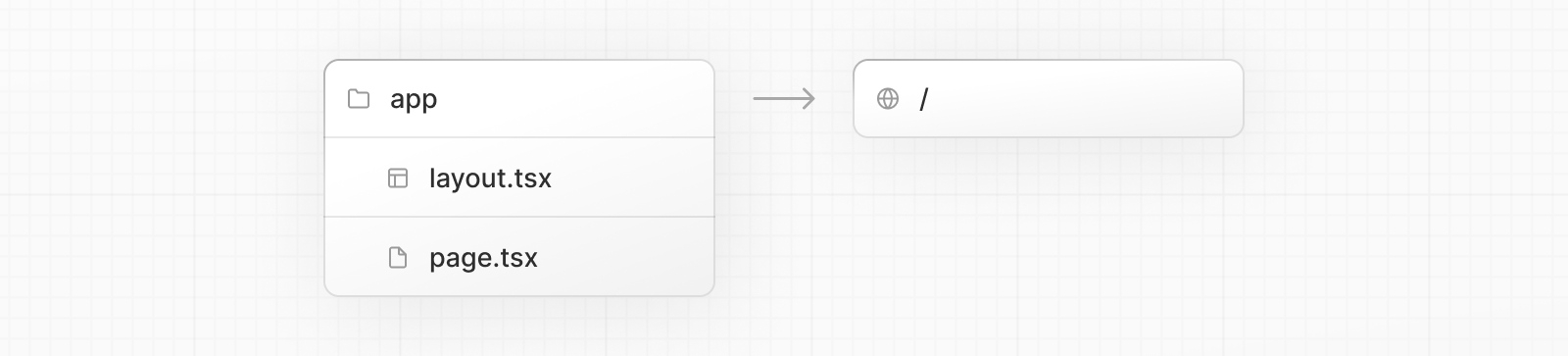
Create a [root layout](/docs/app/building-your-application/routing/pages-and-layouts#root-layout-required) inside `app/layout.tsx` with the required `` and `` tags:
**TypeScript**
```tsx title="app/layout.tsx"
export default function RootLayout({
children,
}: {
children: React.ReactNode
}) {
return (
{children}
)
}
```
**JavaScript**
```jsx title="app/layout.js"
export default function RootLayout({ children }) {
return (
{children}
)
}
```
Finally, create a home page `app/page.tsx` with some initial content:
**TypeScript**
```tsx title="app/page.tsx"
export default function Page() {
return Hello, Next.js!
}
```
**JavaScript**
```jsx title="app/page.js"
export default function Page() {
return Hello, Next.js!
}
```
> **Good to know:**
>
> If you forget to create `layout.tsx`, Next.js will automatically create this file when running the development server with `next dev`.
Learn more about [using the App Router](/docs/app/building-your-application/routing/defining-routes).
#### The `pages` directory (optional)
If you prefer to use the Pages Router instead of the App Router, you can create a `pages/` directory at the root of your project.
Then, add an `index.tsx` file inside your `pages` folder. This will be your home page (`/`):
```tsx title="pages/index.tsx"
export default function Page() {
return Hello, Next.js!
}
```
Next, add an `_app.tsx` file inside `pages/` to define the global layout. Learn more about the [custom App file](/docs/pages/building-your-application/routing/custom-app).
**TypeScript**
```tsx title="pages/_app.tsx"
import type { AppProps } from 'next/app'
export default function App({ Component, pageProps }: AppProps) {
return
}
```
**JavaScript**
```jsx title="pages/_app.js"
export default function App({ Component, pageProps }) {
return
}
```
Finally, add a `_document.tsx` file inside `pages/` to control the initial response from the server. Learn more about the [custom Document file](/docs/pages/building-your-application/routing/custom-document).
```tsx title="pages/_document.tsx"
import { Html, Head, Main, NextScript } from 'next/document'
export default function Document() {
return (
)
}
```
Learn more about [using the Pages Router](/docs/pages/building-your-application/routing/pages-and-layouts).
> **Good to know:**
>
> Although you can use both routers in the same project, routes in `app` will be prioritized over `pages`. We recommend using only one router in your new project to avoid confusion.
#### The `public` folder (optional)
Create a `public` folder to store static assets such as images, fonts, etc. Files inside `public` directory can then be referenced by your code starting from the base URL (`/`).
## Run the Development Server
1. Run `npm run dev` to start the development server.
2. Visit `http://localhost:3000` to view your application.
3. Edit `app/layout.tsx` (or `pages/index.tsx`) file and save it to see the updated result in your browser.
## Next Steps
Learn about the files and folders in your Next.js project.
- [Project Structure](/docs/13/getting-started/project-structure): A list of folders and files conventions in a Next.js project
---
For a semantic overview of all documentation, see [/sitemap.md](/sitemap.md)
For an index of all available documentation, see [/docs/13/llms.txt](/docs/13/llms.txt)